Frequently Asked Questions - Mii Renderer (REAL)
It only took two years, huh? If you want a question featured here, simply ask me frequently.
Model Export
How do I convert? How do I get a 3D model file?
First, obtain a render. Second, click this “convert” dropdown. Finally, there’s a download button for the model export tucked into there.
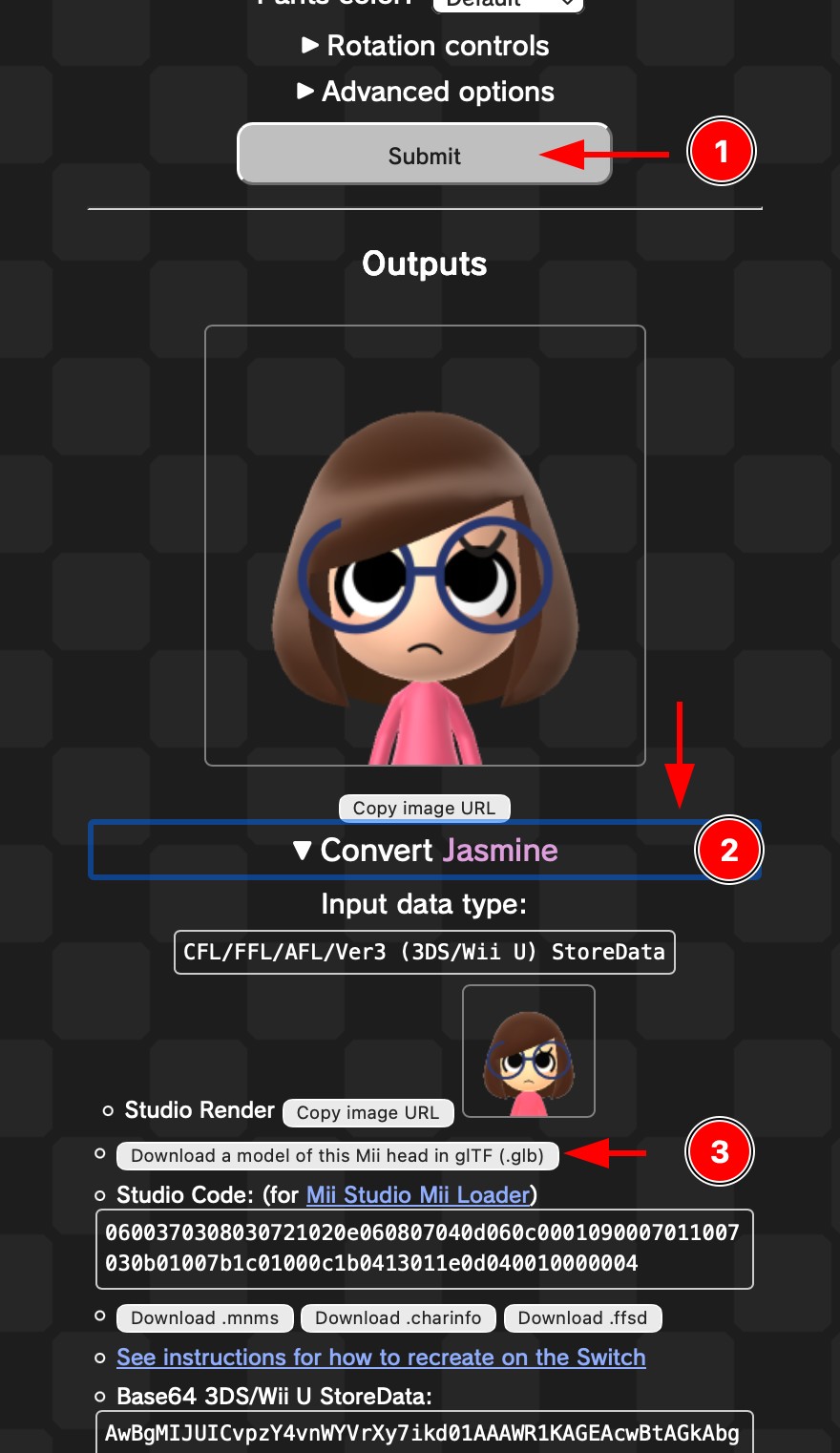
Additionally, the conversion options are available:
- Studio Code: For the Nintendo Account Mii editor, aka “Mii Studio”. See the browser extension linked.
- mnms: Also for the browser extension linked.
- charinfo: Nintendo Switch Mii data format. Importable into some other programs.
- ffsd: 3DS/Wii U Mii data format. This is usually the most compatible.
Sorry, there’s no option for Wii format (rcd, rsd, mii, miigx, mae).
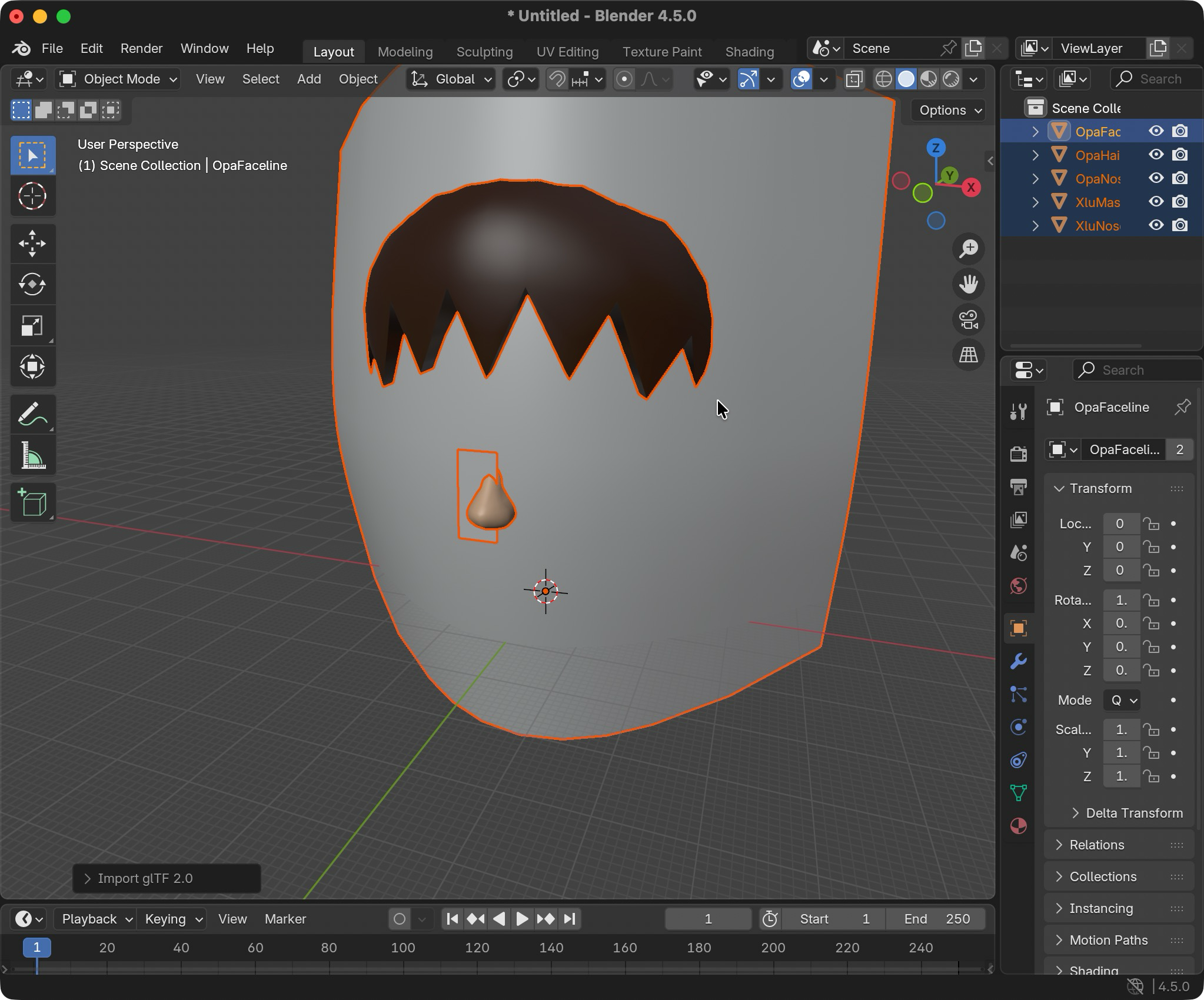
I opened the model in Blender and it’s all gray, there’s no face.
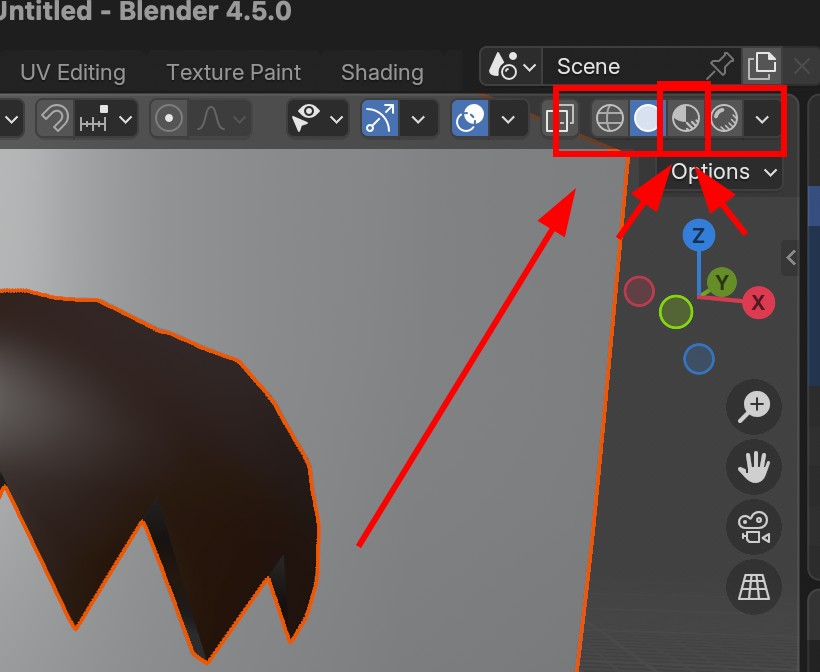
Are you seeing this? This is because Blender doesn’t show textures by default.
At the top right corner of your screen, press the third circle. This will display the face.
The 3D model has no body, can you add it?
My answer is complicated and comes down to: tech debt, laziness, lack of motivation… you know, that good stuff. I want to add it, but it won’t work with the current solution.
What about body poses?
Same answer as above. I pretty much lost motivation after mii.nxw.pw added them, so get your sh❤️tty pose PFPs there.
Mii Data
How do I edit my Mii? Where do I get data from?
If you’re asking this question, this isn’t the site you’re looking for. Sorry.
For creating and editing Miis without a console, here are your options:
- Nintendo Account “Mii Studio” web editor
- mii.nxw.pw - Requires joining this Discord.
- Pretendo Mii Editor - Requires creating an account.
- After updating it, click the “force refresh” option in order to show the latest update.
My QR Code isn’t working.
Does it work on a real console?
- Usually, codes created by emulators are invalid.
- If you’re using mii.nxw.pw, try disabling gold pants (it won’t show here anyway).
Sometimes submitting a picture file doesn’t work if it’s too detailed.
- This is due to the moiré pattern.
- Try scanning with a camera.
This is just my most common advice, but please feel free to email me (even if you’re shy or think it’s a dumb question), I’ll help you deduce the problem or decode from an emulator or console.
Meta
Why is your site called “mii-unsecure”? Is it really safe?
Don’t you love a good inside joke that only like 5 people will ever get?
It’s a play on how Miiverse’s Mii icons were served from a domain called mii-secure.cdn.nintendo.net. Duplicating those icons is actually one of the main reasons I created this.
I’ve planned on buying a new domain, but I kinda sorta only want to do it when I give this site a huge epic upgrade or something.
I can’t tell you if it’s secure or not, I can’t exactly protect your family or secure a loan or anything like that.
Is your rendering fully accurate?
Mostly yes, but:
- Miitomo body is slightly off and has inaccurate scaling
- There are a few parameters from the official Nintendo Account API not fully implemented
Development
I want to use this for my app or website, do you have any advice?
- Make sure your thing works even if my website is down, which happens sometimes.
- Don’t hardcode my URL, put it in a configuration so it can be easily changed.
- I highly recommend self-hosting.
- Feel free to use all of the options you want, but higher quality usually means slower and heavier.
I’m a developer, do you have anything cool for me?
- FFL.js: Accurate Mii rendering from JS with shaders and body scaling.
- ffl-raylib-samples: Showing how to render Miis in an easy C game engine.
- FFL-Testing: Source of the current server. See if you can reuse parts, or something.
- My JSFiddles: JavaScript tools for QR codes, parsing, rendering, and more.
I unfortunately don’t have anything to offer other than this, but I’m always working on stuff that will make Mii parsing and rendering easier. Read this blog post for my plans on making a library, as well as my plans for a modular renderer.
Are you going to add anything?
I expected myself to be done with the current design you see months and months ago, but alas, I never got around to it especially with the full-time job that I have.
Nowadays (mid-2026) I’m still dedicated to Mii reversing and custom tools, but it’ll be a while before I get to work on anything “user-facing” again because there’s so much that’s piled up on me. Also, keep in mind that this originally replaced an older “Mii Renderer” site that constantly went down which this replaced after 4 years.
However, I’ve planned for more than a year to fully replace the “renderer” with sets of versatile Mii tools, including a nice editor. They’re just plans, though. If you’re reading this far, though, check out the post I wrote about it.
Why did it take you two years to add this basic FAQ?
SHUTUPSHTUSPSHTSUPSSHUTHSPHSUTHUPSHUYSHUPTHUSPOHTUPSTHUPSUP